For criminal defense attorneys and their staff
What's in hour four that nobody watched?
Bodycam Reader reads body cam footage on your own computer and shows you moments worth a second look, such as an officer saying two different things, plus the stretches where it got no words. Every one comes with a timestamp, so you go listen for yourself. It can miss things, and it says so.
First case free, then $99 a seat a month. No card to start. Mac or Windows.
- Local evidence processing. In local mode, recordings and transcripts stay on your computer. Account and update checks use the internet. Optional cloud analysis sends the transcript text, your note and your questions to Anthropic.
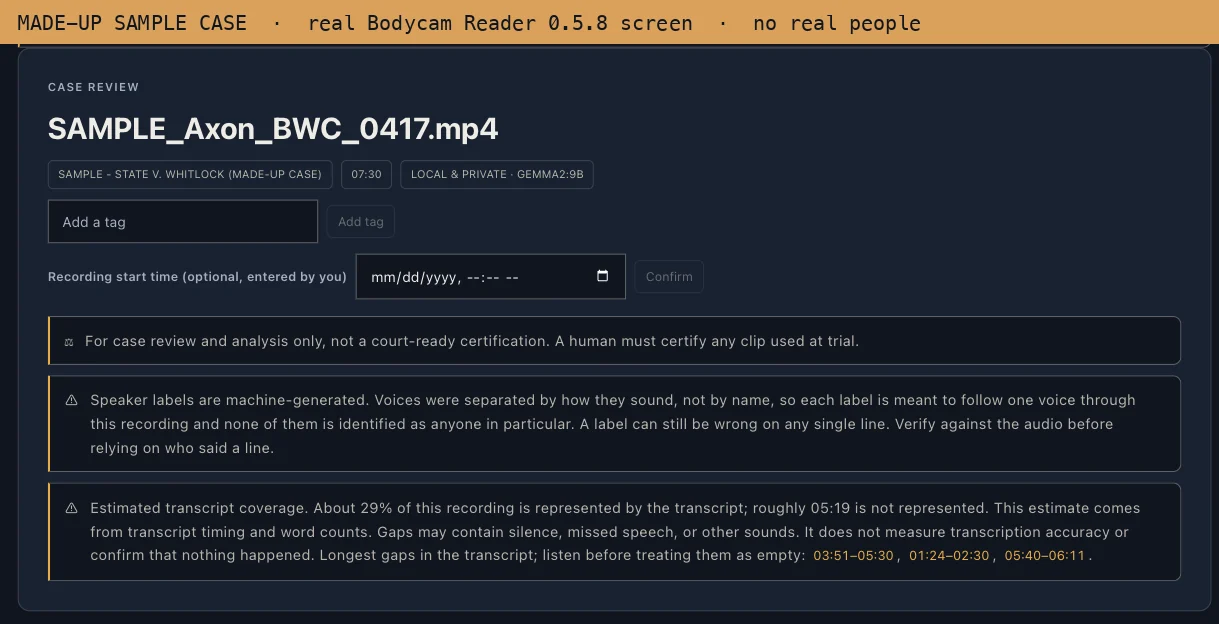
- It marks where it got no words. Those stretches may hold silence, noise, or speech it missed, so they are listed for you to listen to, not skipped.
- First built for a criminal defense firm. A finding aid, never legal advice.
The whole recording · 6h 12m
A made-up illustration of what a review looks like, not a test result. No real footage, no real people. Click a mark on the strip, or scroll down.
How it works
Point it at the file. Come back to a map of the recording.
Make an account and install it
It installs like any other program on a Mac or a Windows PC. A one-time setup then downloads the parts that listen and read, about 9 GB, so the work can happen on your computer. No card.
Drop in the body cam file
The discovery you already have. In local mode the recording is read on your computer and nothing is uploaded. On an ordinary office PC it can take several times longer than the recording itself, so leave the computer on with the app open.
Read the moments, then check the tape
A timestamped transcript, flagged moments, possible inconsistencies, and the stretches it could not hear. Click a time and the video jumps there. You can also ask it questions in plain English.
The sample case
Try it here, on a made-up traffic stop.
An illustration of the kind of thing it hands back, on an invented case. It is not the output of a real run; real screens from the app follow below. Nothing is downloaded and nothing you type leaves this page.
Worth a second look. Each one points back at the tape.
The same person, two different answers, with both timestamps so you can go listen. These are machine suggestions to check, not conclusions, and the app can miss a real one: on our own made-up test recording, version 0.5.8 flagged both odor lines as moments but did not pair them.
Every word it heard, with the time it was said. This sample shows 12 lines; a real recording runs to thousands.
Where it got no words, it says so instead of skipping past it. A gap may be silence, noise, or speech it missed, so listen to the ones that matter.
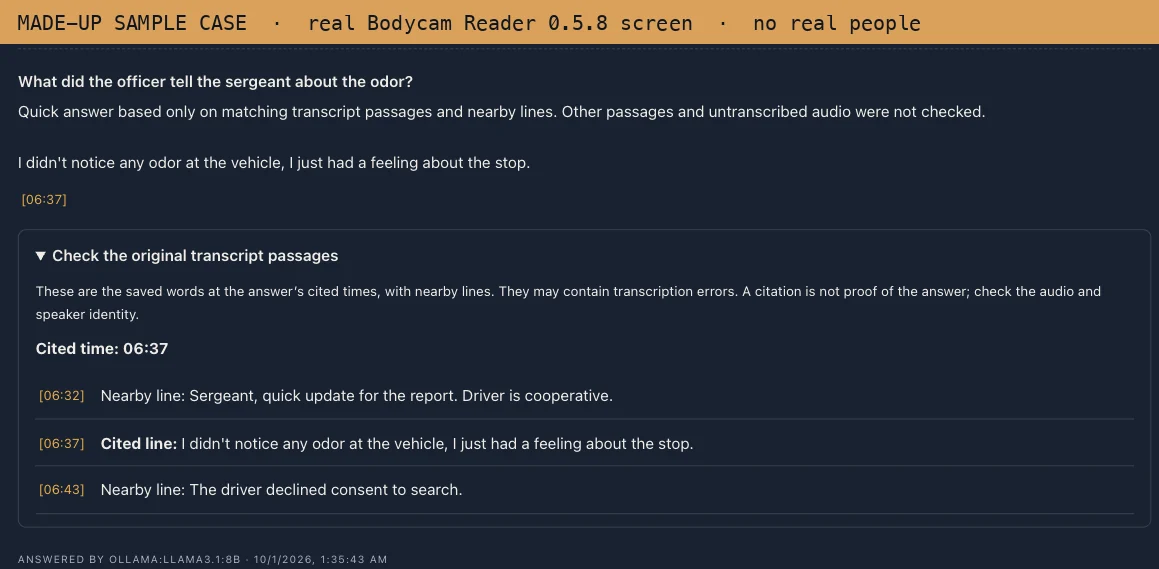
On this page the box is a plain word search over the 12 sample lines. In the app, Ask uses an AI model on your computer that answers from the transcript and shows the lines it relied on, so you can check them. The first question downloads that model (about 5 GB), and on a computer without Apple silicon answers can be slow.
Every line it finds shows the time it was said.
On a real case the app does this for your recording, on your computer, and every time links back to the video.
The real app, on a made-up case
Two screens from Bodycam Reader 0.5.8 after it read a short invented recording on a Mac. Synthetic voices, no real people. Nothing on them was painted in.
Why not just upload it to an AI?
You could. Here is what changes when it stays on your computer.
Plenty of firms already paste transcripts into a chat tool or use a cloud review service. Both can work. The difference is where your client's footage goes, and what you pay.
| Question | Bodycam Reader, local mode | Uploading to an online AI or cloud tool |
|---|---|---|
| Where the footage goes | It stays on your computer. Local mode is the default, and it reads the recording there. | A copy goes to the provider's servers, under their terms. |
| Sealed or protected discovery | Local mode does not send the footage anywhere. You still decide whether your order allows the tool. | The footage goes to a third party, which some orders restrict. |
| Your choice, case by case | An optional cloud mode can be picked for one case, or for a single question, using your own Anthropic key. It sends transcript text, your questions and any note you type, never the video. | Uploading is how it works. |
| What it costs | Published: first case free, then $99 a seat a month, less for bigger offices. | Varies by tool. Some publish prices; some quote on a sales call. |
| Who it is for | Solo and small defense firms, and the person who actually sits through the footage. | Varies by tool. |
This is general information, not legal advice. Whether a protective order or your ethics rules allow a given tool is your call to make; read the order.
Read before you buy
What it can't do.
Every tool tells you what it catches. Here is what this one misses.
It will miss things.
Automatic transcription mishears words and speakers, and loses audio under wind and traffic. Nothing here is a guarantee that anything in particular was found.
It does not replace watching the footage.
It is a finding aid. It shows you where to look. The recording is still the only thing that counts.
It gives no legal advice.
It will tell you an officer said two different things. It will never tell you what that means for your case.
Bad audio stays bad audio.
No software recovers words that were never captured. That is what the coverage view is for.
Price
Published prices. No sales call.
A single body cam case can be hours somebody has to sit through, and a real matter can carry several. One seat per person, whatever their title.
First case free.
Your firm's first case is free. Make an account, install it, and run one real recording. No card to start. If it earns its keep, add seats.
Run your first case free$99 a month, or $950.40 a year
Tiers stack: seats 1–2 are $99, seats 3–9 are $79, seats 10 and up are $59. Same numbers the checkout uses.
What leaves my computer?
In local mode, which is the default, your video, transcript, findings and questions stay on your computer. The app goes online to sign you in, to check before each new case that your firm's account can run it (it sends a device code and the app version), to check your account again when you ask a question or retry, and to check for updates. None of those carry anything about your case.
The first time you set it up, and the first time you ask a question, it downloads the AI parts it needs. None of that sends anything about your case. The app has no analytics or crash reporting.
If you choose cloud mode for a case, the transcript text, any note you type, and the questions you ask about that recording go to Anthropic, using your firm's own key. Choosing it for a single question sends that question and the transcript text. The video never goes. Privacy policy
Can I use it on discovery under a protective order?
That depends on your order, so read it; this is general information, not legal advice. What we can tell you is what the software does: in local mode the recording is read on your own computer and is not sent to us or to anyone else.
Under our Terms you stay responsible for following any protective order, sealing order or court rule (section 4.4), and cloud mode should not be turned on for privileged, sealed or protected material unless you have decided it is allowed (section 4.3).
What kind of computer do I need?
Mac: Apple silicon or Intel. The app needs macOS 13 or newer, and reading recordings on the Mac needs macOS 14 Sonoma or newer. The one-time setup uses Homebrew.
Windows: Windows 10 or 11, 64-bit (x64). 16 GB of memory is recommended; with less, the app warns it may be very slow or fail. A graphics card is not needed. If you have an NVIDIA card with a recent driver, setup picks a version that uses it.
Space: the download is about 400–500 MB, and the one-time setup adds about 9 GB. The first question you ask downloads about 5 GB more. Each recording is also copied into the app's own folder, so leave room.
How long does a recording take?
On an ordinary office PC, plan on hours. On one office PC with no graphics card, an 18-minute clip took about an hour and a half, about five times its length (measured in September 2026 on the previous version). At that pace a recording several hours long can take more than a day, so leave the computer on with the app open.
While it works, the app shows which step it is on and how long it has run. Once you have finished a case of similar length on that computer, it also estimates the time left. Macs with Apple silicon are much faster.
What if the computer restarts or goes to sleep in the middle?
While it is open, the app keeps the computer from going to sleep by itself. Closing the app, closing a laptop lid, or a Windows restart does stop it.
When you open the app again, the case is marked Stopped, with a note that it was interrupted. The recording is fine. Click Retry and it starts that recording over from the beginning, so a long run that is cut off near the end loses that time. A retry usually does not use up another case.
Windows: Setup or Portable?
Use Setup. It installs for you alone, needs no administrator password, and updates itself. Portable is a single file that runs without installing, but it does not update itself.
The Windows installer is not code-signed yet, so Windows may say the file "isn't commonly downloaded" or that the publisher is unknown. In Microsoft Edge, open the menu beside Delete and choose Keep anyway.
Does it need the internet?
To start a new case or ask a question, yes: it checks your firm's account first. Cases you have already finished open without a connection.
What do I get back?
A timestamped transcript with speakers separated by voice, flagged moments, possible inconsistencies to check, a note of how much of the recording produced words and where the gaps are, and an Ask box for questions (the first one downloads its model). Click any time and the built-in player jumps there. You can save the review as a PDF, print it, or download it as text.
Speaker labels and quotes are machine output. Check them against the audio before you rely on them.
What does it take, and how many files at once?
Video and audio files such as MP4, MOV, WAV and M4A, with no size limit. One recording per case.
How does "first case free" work?
Your firm's first case is free, with no card. After that it is $99 a seat a month for the first two seats, $79 for seats three to nine, and $59 from ten up, or 20% off paid yearly. Cancel any time; it runs to the end of what you paid for, and there are no refunds for the time left.
Get it
Run your next body cam case through it, free.
Create your account, then you get the download link for your computer. Point it at discovery you already have.
- Mac: Apple silicon and Intel. Local & Private processing requires macOS 14 Sonoma or newer; the app itself needs macOS 13 or newer. Find the right Mac download
- Windows: Windows 10 or 11, 64-bit. 16 GB of memory recommended. No graphics card needed.
- Space: about 400–500 MB to download, then a one-time setup of about 9 GB for the parts that listen and read. That is how it works without sending your case anywhere.